


Features
Interactive Flat Panel with AI Features
boardEX is an AI-powered interactive flat panel built for modern classrooms and professional environments. Each feature on this page is explained in technical detail, covering exactly how it works, what input it accepts, what output it produces, and which formats and curricula it supports. If you are evaluating boardEX for your school or institution and want to understand the technology behind the panel, this page covers everything you need.
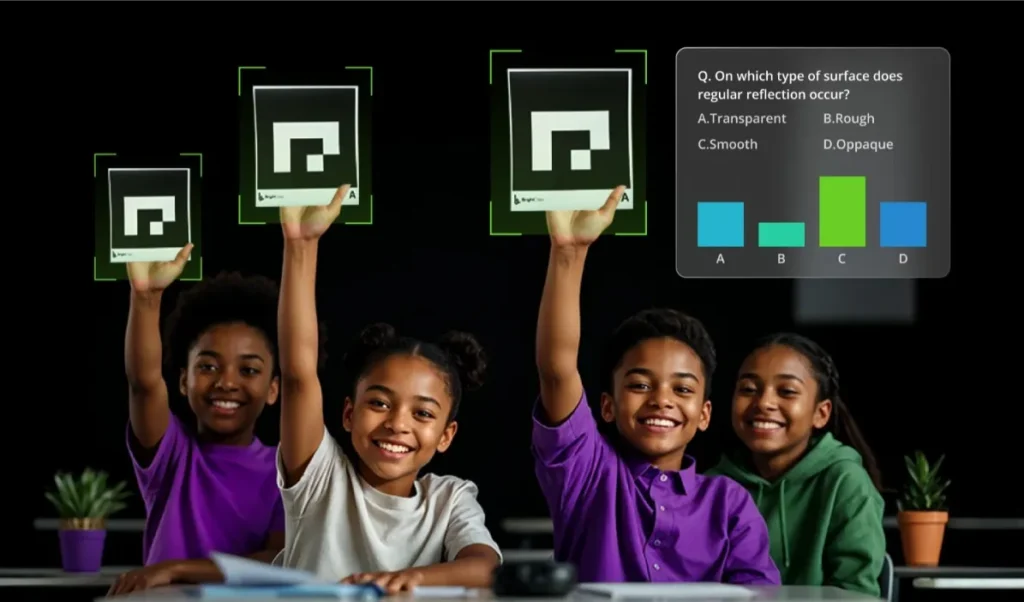
One panel. Every classroom workflow.
Jump to any feature below. Each section explains how it works, what it accepts and what it produces.
Chemistry Recognition
Handwritten equations digitised and solved step by step.
Curriculum Content
CBSE, ICSE and more, ready for every class.
AI Lesson Plans
Topic, class and language in; full plan out.
Maths Recognition
From arithmetic to calculus, with reasoning shown.
Mind Maps
Three levels deep, colour-coded, exportable.
Quiz Generation
Context-specific questions, never a generic bank.
Text Recognition
English, Arabic (RTL), French and more.
Virtual Labs
3D physics, chemistry and biology simulations.
Teach It · New
Any topic becomes an interactive AI lesson.
AI Attendance · New
Face recognition attendance via the panel camera.
Sentinel · New
Central classroom monitoring and AI insights.
Specs & FAQ
Touch, 4K, software, connectivity and lifespan.
Chemistry Equation Recognition
How It Works
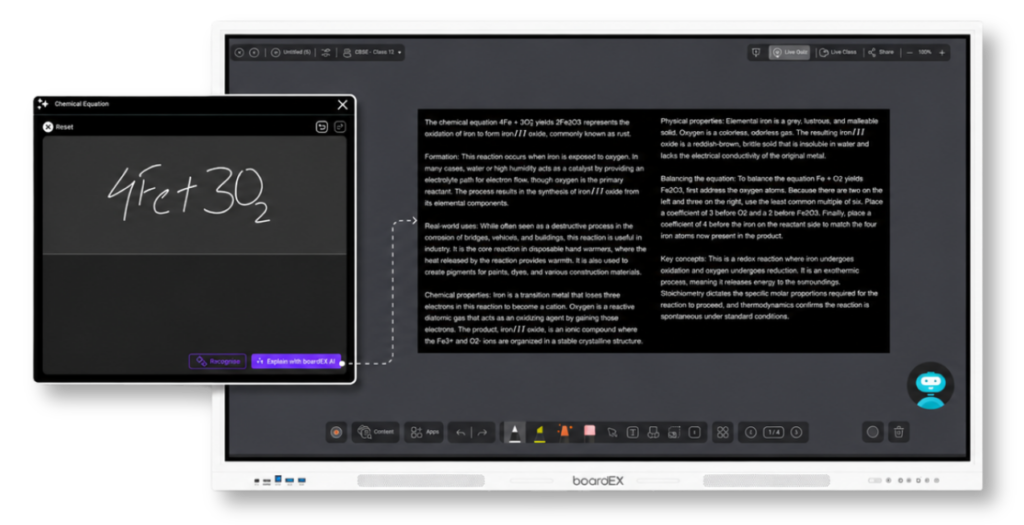
The chemistry equation recognition engine uses optical character recognition (OCR) trained specifically on chemical notation. When a teacher or student writes a chemical equation by hand directly on the panel, the system identifies individual elements, compounds, subscripts, superscripts, and reaction symbols in real time.
Supported notation types
- Molecular formulas (e.g. H₂O, CO₂, NaCl)
- Balanced and unbalanced chemical equations
- Multi-step reaction sequences
- Subscripts, superscripts, and ionic charges
- Structural formulas for organic chemistry
Output generated automatically
- Digitised, clean version of the handwritten equation
- Step-by-step solution with working shown
- Auto-generated quiz questions based on the equation
- Summary notes explaining the reaction in plain language
- Supplementary learning materials for extended study
Built-In Curriculum Content
Coverage & Access
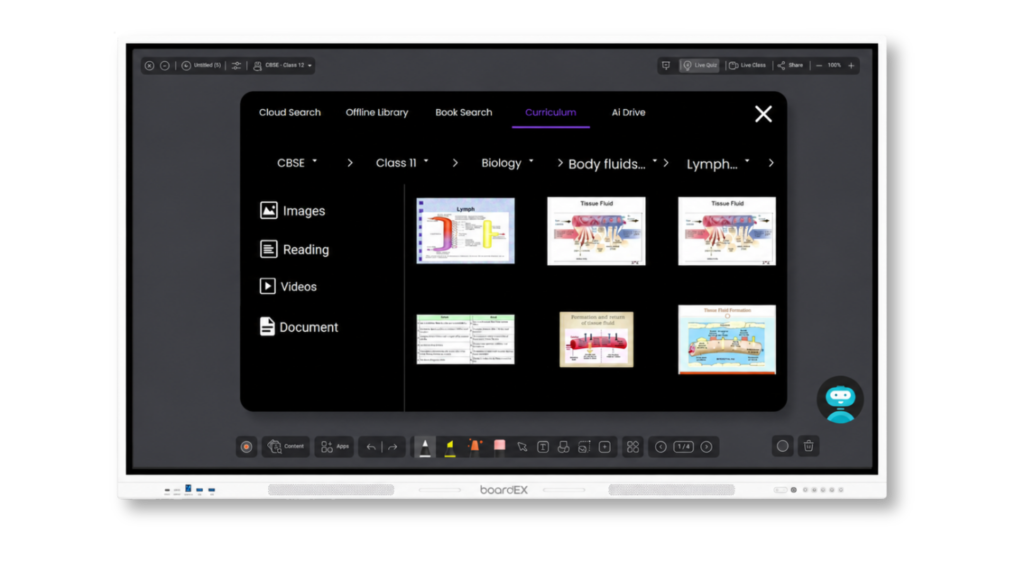
The Interactive Flat Panel includes comprehensive built-in curriculum content covering all classes and major syllabuses. Teachers are able to access ready-made materials that are already aligned to their curriculum, reducing preparation time significantly. The supported curriculum boards are shown below.
| Curriculum | Classes Covered | Content Available |
|---|---|---|
| CBSE | All Classes | Lessons, Videos, Assessments |
| ICSE | All Classes | Lessons, Videos, Assessments |
| Additional Syllabuses | All Classes | Lessons, Videos, Assessments |
Content is also easy to share with other staff members, supporting collaborative planning and consistency across year groups and departments.
AI Lesson Plan Generator
Input, Output & Customisation
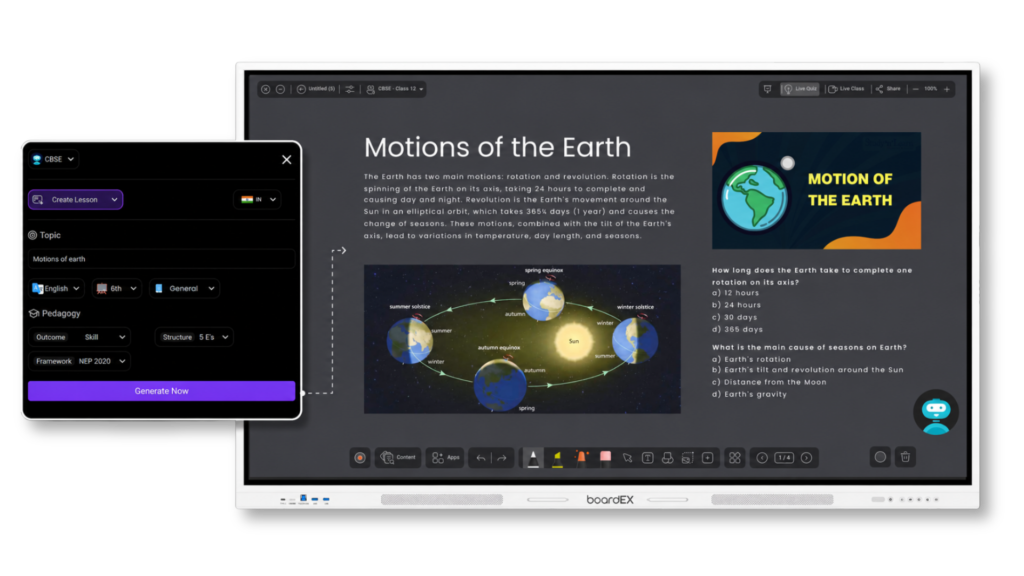
The lesson plan generator takes three inputs from the teacher: topic, class level, and preferred language. From these three fields, the AI produces a complete, structured lesson plan without requiring any additional data entry.
Topic+Class level+Language→Complete lesson plan
Context & objectives
- Clear written introduction
- Comprehensive overview of the topic
- Curriculum-aligned lesson objectives
Engagement & assessment
- Relevant videos based on subject and class level
- Supporting images and visual aids
- Auto-generated mind map
- Quiz questions or evaluation tasks
- Printable or shareable format
Maths Equation Recognition
Supported Expression Types
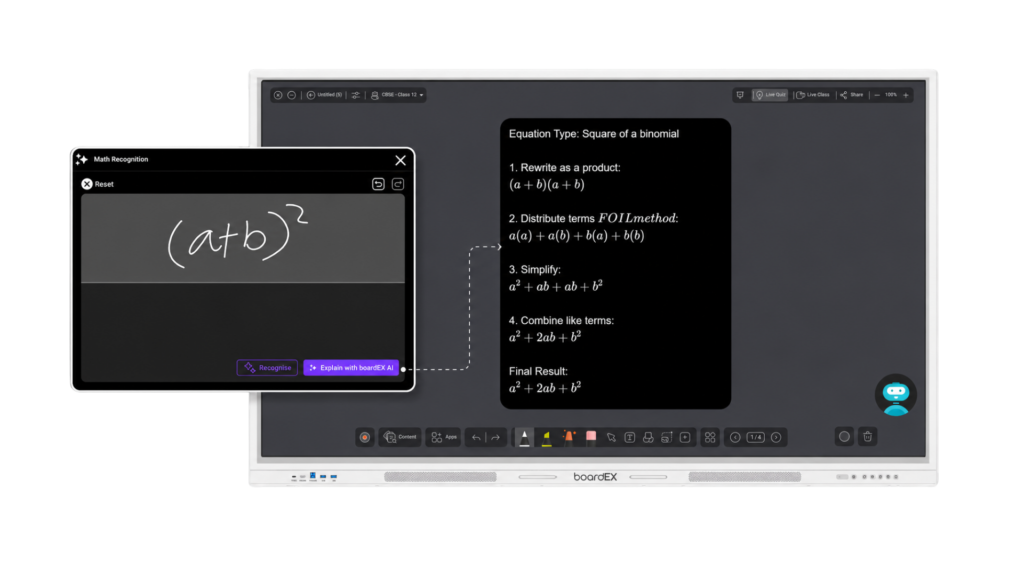
The maths engine reads handwritten or typed mathematical expressions directly from the panel surface. The system processes the input and returns a fully worked solution with each step clearly explained. This is not a simple calculator, it shows the reasoning behind each calculation so students understand the method, not just the answer.
Supported mathematical formats
- Arithmetic and algebraic expressions
- Fractions, indices, roots, and surds
- Trigonometric functions: sin, cos, tan and their inverses
- Logarithms and exponential equations
- Calculus: derivatives and integrals
- Matrices, vectors, and advanced notation
Output format
- Step 1 through Step N, each calculation stage shown separately
- Final answer clearly highlighted
- Option to generate a quiz from the same expression
Mind Map Generation
Structure & Use Cases
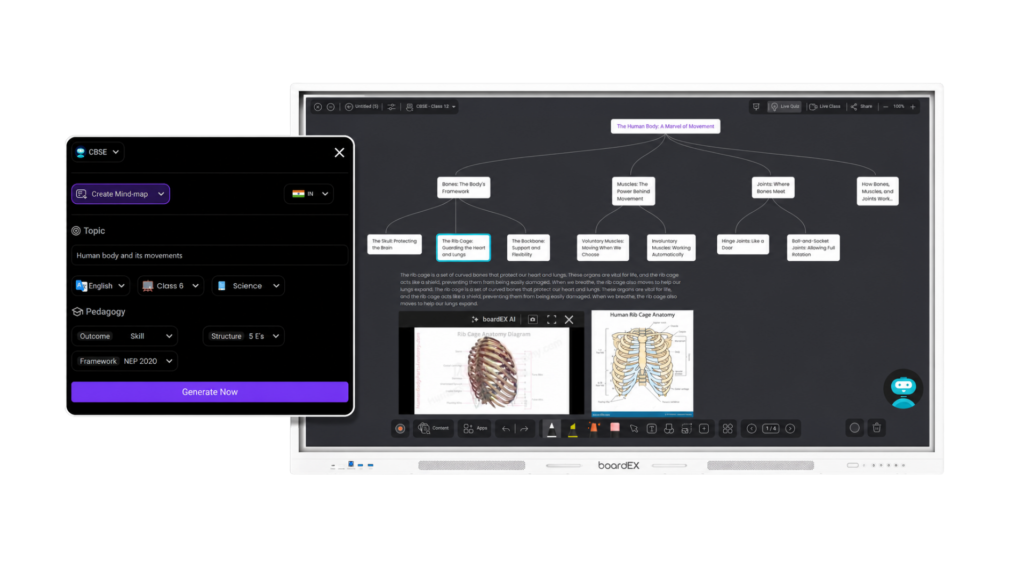
Mind maps are generated from a single topic input. The AI identifies the key branches, sub-topics, and relationships within that subject and arranges them in a clear, readable layout on the panel display.
Technical output
- Central topic node with branching sub-topics
- Hierarchical structure with up to three levels of depth
- Colour-coded branches for visual differentiation
- Exportable and shareable in digital format
Intended use in a teaching session
- Topic introduction: display overview before teaching begins
- Mid-lesson summary: consolidate what has been covered
- Revision tool: full unit overview in one visual
Quiz Generation
Generation Logic & Question Types
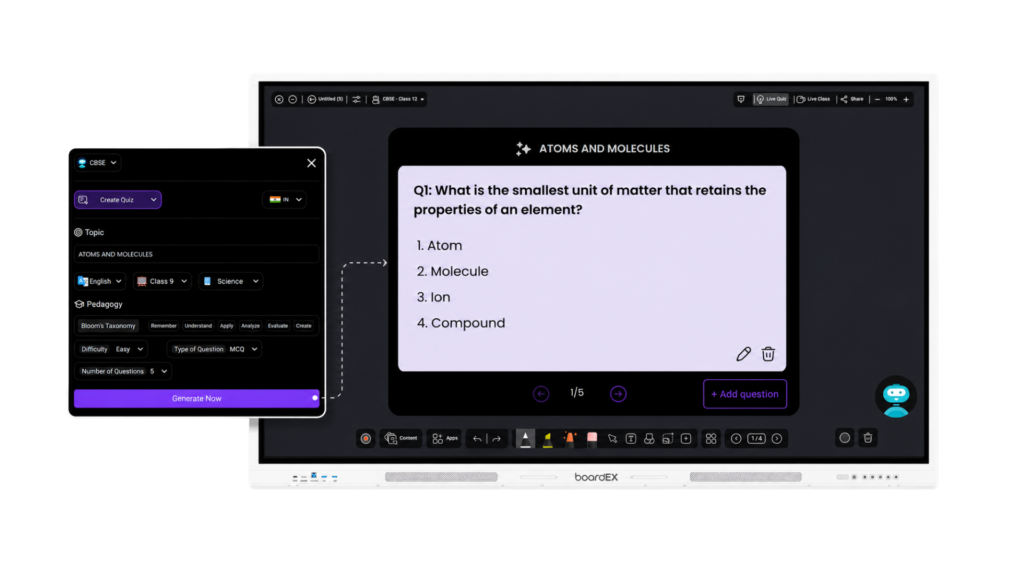
Quizzes are generated directly from the topic or lesson content loaded onto the panel. The system does not use generic question banks. It generates questions that are contextually specific to the exact content being taught in that session.
How the generation works
- Input: topic name, lesson content, or existing quiz
- Output: multiple question sets with varied formats
- New quizzes can be derived from existing ones, building a question bank over time
- Summaries are co-generated alongside quizzes for teacher review
Question formats supported
- Multiple choice
- Short answer
- True or false
- Fill in the blank
Text Recognition
Languages & Output Format
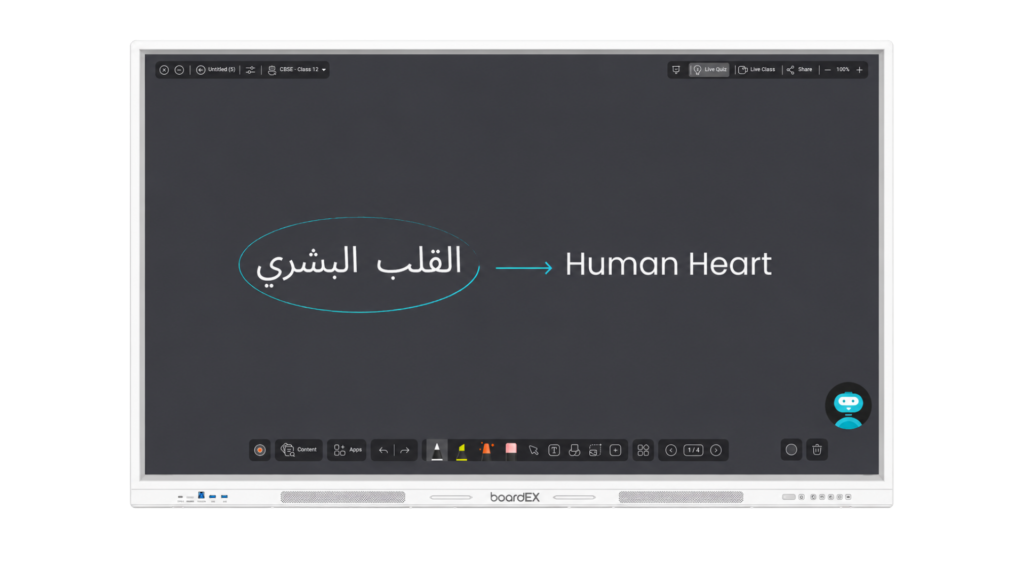
The text recognition feature converts natural handwriting written anywhere on the panel into clean, editable digital text. The engine is trained across multiple scripts and handles natural handwriting variations without requiring the user to write in a specific style or font.
Supported languages
- English
- Arabic (including right-to-left script handling)
- French
- Additional languages included in multilingual support pack
Output capabilities
- Instant conversion with no manual review required
- Editable text ready to copy, save, or share
- Direct export to lesson notes or PDF
- Compatible with DMS (Device Management System) for remote access
Virtual Labs
Simulation Scope & Technical Format
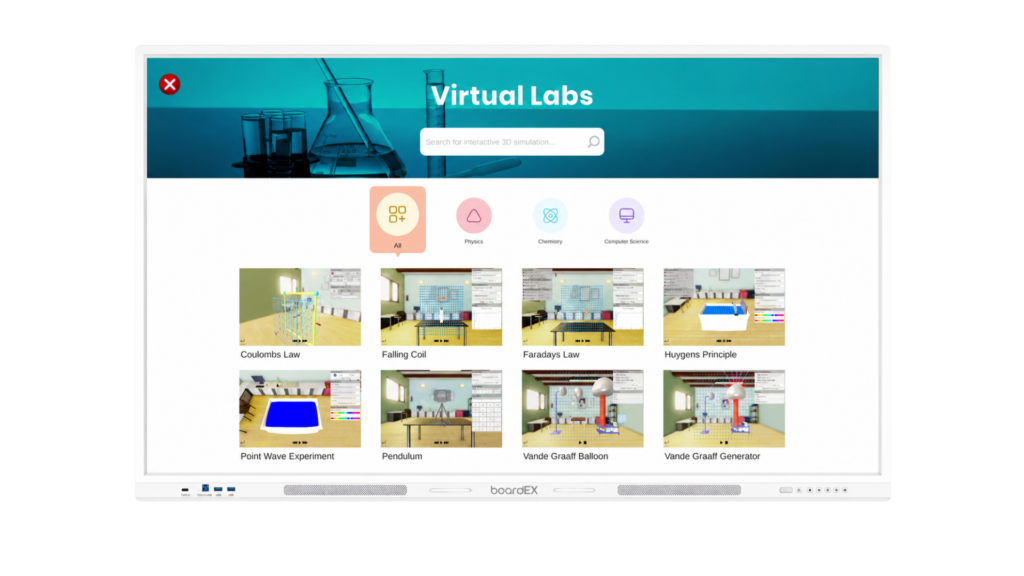
The virtual labs module provides screen-based simulations of laboratory experiments. Students interact with the simulation directly on the panel, following the same procedural steps they would use in a physical lab environment.
Simulation categories available
- Physics experiments: circuits, mechanics, optics
- Chemistry experiments: reactions, titrations, molecular models
- Biology experiments: cell structure, dissection models, ecosystem simulations
Technical format
- Interactive 3D rendered environment
- Touch-based controls directly on the panel surface
- Step-by-step procedure prompts built into the simulation
- Assessment integration: quiz generated after lab completion
TEACH IT – AI-Powered Interactive Teaching
What it does
The Teach It feature turns any topic into an interactive teaching session between the teacher and students.
How it works
- Write a topic on the panel, such as “Solar System.”
- Circle/select the topic and click the AI option.
- Choose Whiteboard or Blackboard mode.
- The panel generates detailed learning content, including explanations, notes, text, and relevant visuals/images.
- Click the AI option again and select Teach It.
- Choose the duration, language, and teaching style.
- Select Interactive Mode and click Generate.
- The panel creates an interactive teacher-student learning session, with a teacher explaining the topic and students responding/interacting.
It makes lessons more engaging by turning static content into an interactive classroom experience.
AI Attendance – Smart & Easy Attendance Taking
What it does
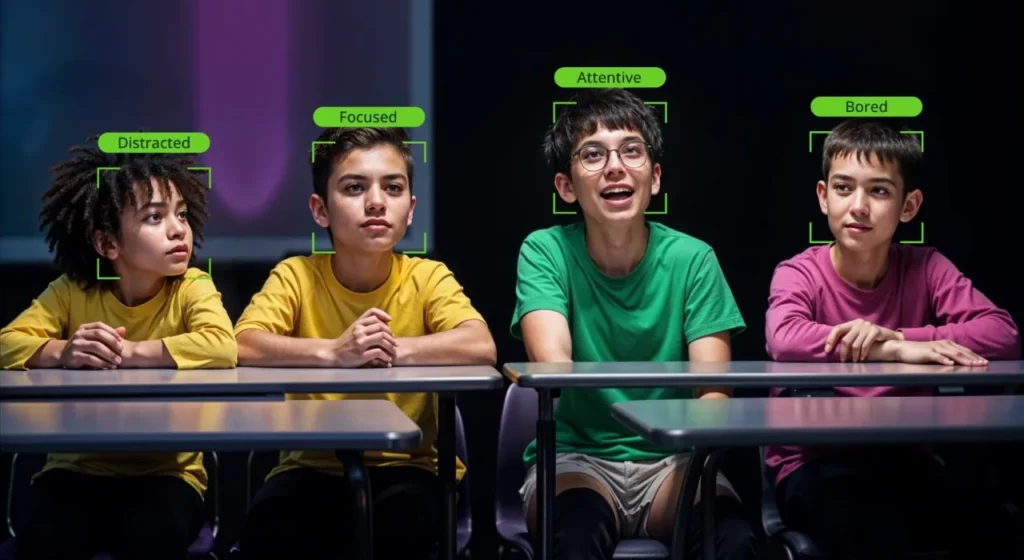
The new attendance feature allows teachers to take student attendance using the panel camera and face recognition.
How it works
- Add the class and teacher details.
- Open the Attendance option.
- Use the camera to scan the students.
- For a new student, add their name and face details.
- The student’s face can be registered from multiple angles: front, left, right, etc.
- Once registered, attendance can be marked using the Take Attendance / Mark Attendance option.
- Attendance for multiple students can also be taken together.
The feature helps make classroom attendance faster and more convenient.
SENTINEL – Smart Classroom Monitoring & Insights
What it does
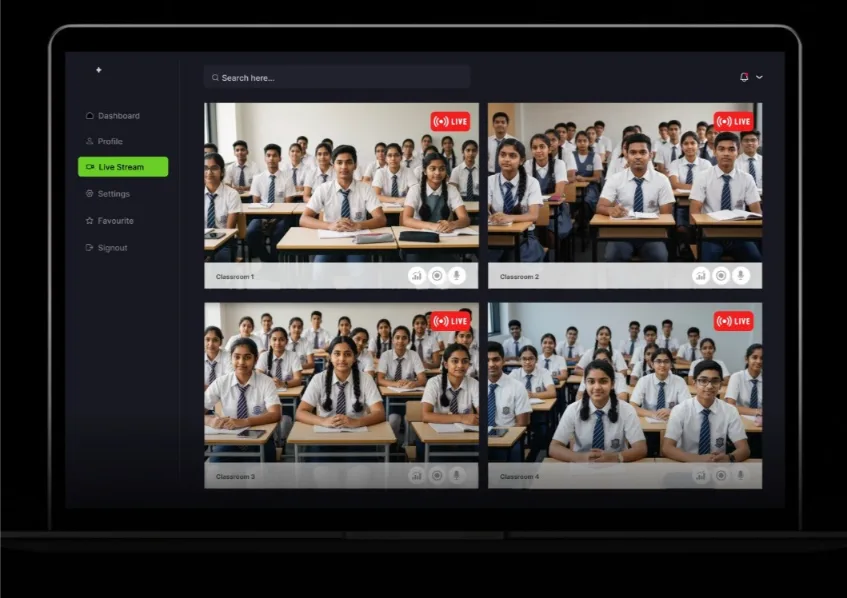
Sentinel gives school administrators a centralised view of classrooms equipped with the panel. From the admin portal, they can access classroom cameras, microphones, panel screens, and classroom activity.
What administrators can access
- Live/recorded classroom activity
- Teacher activity and classroom discussions
- What is displayed or written on the panel
- Camera and microphone feeds
- Student classroom activity
- Multiple classrooms and panels from one admin portal
- System status, such as power availability or camera/app usage
Sentinel reports & AI summary
- Classroom reports and summaries
- Search for specific moments in class
- Ask questions about a particular class or time period
- Receive relevant information from the recorded data
Sentinel helps administrators stay connected with classroom activities and gain useful insights without being physically present in every classroom.
Frequently Asked Questions
Specifications, software, and connectivity answers for schools and corporate AV teams evaluating boardEX.
What AI features does boardEX offer?
boardEX is built around AI-powered classroom workflows. It can automatically recognize handwritten maths and chemistry equations and convert them into digital text. It generates complete lesson plans, mind maps, and quizzes from a topic or curriculum objective. It also supports virtual labs and provides real-time teaching suggestions, all from a single unified platform.
How does boardEX help teachers save time?
Instead of preparing resources across multiple tools, boardEX consolidates everything in one place. Teachers can generate lesson plans, assessments, and visual content in seconds using AI. Automated quiz and mind-map creation eliminates hours of manual prep, and handwriting recognition removes the need to retype notes or equations.
Can boardEX recognize handwritten equations in Arabic?
Yes. The text recognition engine supports Arabic script, including right-to-left directionality. For mathematical and chemical equations, the recognition engine handles standard international notation regardless of the interface language selected.
How many touch points does the boardEX interactive flat panel support?
The boardEX interactive flat panel supports 20 touch points on the built-in Android system and 40 touch points when running through the optional Windows OPS module. Twenty points is enough for several students to write at the panel simultaneously. The 40-point mode suits larger collaborative sessions in lecture halls and boardrooms where multiple people annotate at once.
What software comes with the boardEX interactive flat panel?
Every panel ships with the boardEX whiteboard app, the boardEX AI assistant, and a device management system that lets IT teams monitor and update panels remotely across a campus. Schools running a full-campus rollout usually lean on that management layer heavily, and our after-sales support team walks IT staff through it during handover. The panel installs standard Android APK files, so institutions can add their own approved applications. It also works with Zoom, Microsoft Teams, and Google Meet.
How do I connect a laptop or phone to the boardEX panel wirelessly?
Wireless sharing runs through K-Share, the screen sharing system built into every boardEX panel. A laptop, tablet, or phone on the same network casts to the display without a cable. This matters most in corporate meeting rooms where visitors present from their own devices and there is no time to hunt for the right adapter.
Is the boardEX interactive flat panel 4K?
Yes. Every panel in the boardEX range is 4K UHD at a 16:9 aspect ratio, built on a D-LED display with a 15000:1 contrast ratio and a 178 degree viewing angle. Brightness is rated at 400 cd/m² minimum and 450 cd/m² typical, which holds readability in classrooms that take daylight from side windows.
How long does an interactive flat panel last?
The boardEX panel is rated for 50,000 hours of display life. For a school running the panel eight hours a day across a 250 day academic year, that works out to roughly 25 years of rated panel life, well beyond a normal procurement replacement cycle. Response time is rated at 2ms or lower, and the touch surface is toughened glass over an infrared touch frame.
Still weighing the panel against your room and budget? Talk it through with a boardEX advisor.
Request a Free Demo WhatsApp +966 55 430 0901