Table of Contents
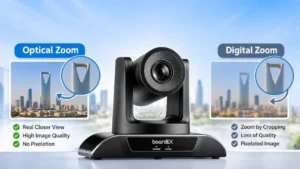
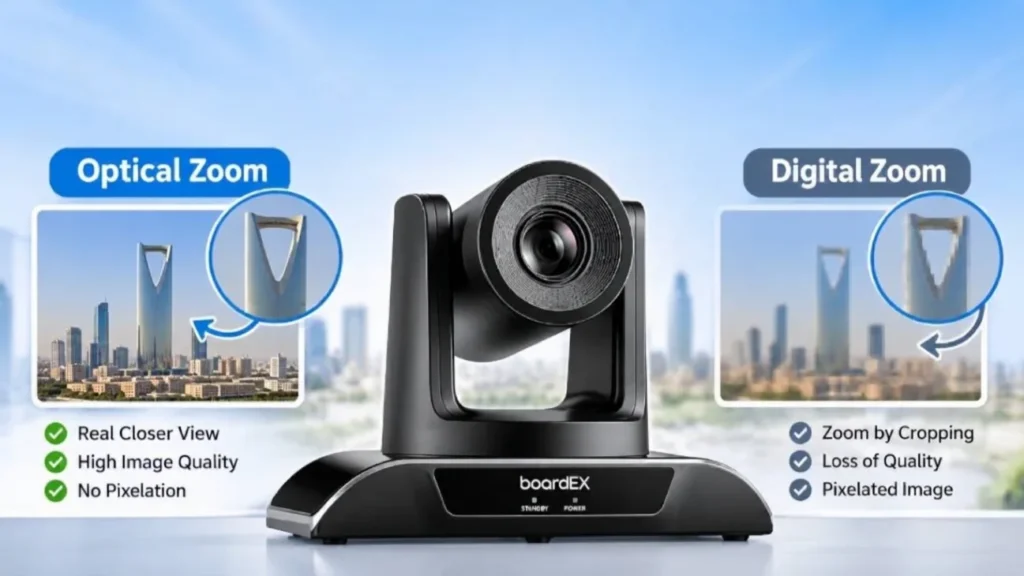
Quick answer: Optical zoom uses the camera’s lens to bring a subject closer, so the picture stays sharp. Digital zoom crops the image and enlarges what is left, so the picture gets softer the more you zoom. For classrooms, lecture halls, and meeting rooms, judge a PTZ camera by its optical zoom. Treat digital zoom as a small extra, not a reason to buy.
What optical zoom does
A PTZ camera with optical zoom has glass lens elements that move inside the camera. When you zoom in, the lens changes its focal length, much like a telescope. The camera’s full sensor still captures the whole picture, just of a smaller area.
That is why an optically zoomed image keeps its full resolution. If the camera outputs 1080p, a zoomed-in shot of a lecturer at the far end of a hall is still a true 1080p image.
The zoom level, such as 10x, 20x, or 30x, tells you how much closer the lens can bring the subject compared with its widest view. You can often check it yourself from the focal length range on the datasheet: divide the longest focal length by the shortest.
What digital zoom does
Digital zoom does not move anything. The camera, or the software you are using, takes part of the image and stretches it to fill the screen.
The problem is that it adds no new detail. If you digitally zoom 2x on a 1080p picture, you are really looking at a quarter of the original pixels, enlarged to fill the frame. Faces lose sharpness, text on a whiteboard becomes harder to read, and the image can look blocky on a large screen.
Digital zoom has its place. It works for small adjustments, or when the camera’s resolution is much higher than the video you send. A 4K camera, for example, can crop into part of its image and still send a clean 1080p stream. But on a 1080p camera, digital zoom always costs you detail.
What about hybrid zoom?
Some cameras advertise “hybrid zoom”, which adds digital cropping on top of the optical range. The term is not a standard, so a “20x hybrid” camera may have only 5x or 10x of real optical zoom. When you compare spec sheets, check that the figure says “optical”. If it says hybrid or digital, ask where the optical range ends. Better still, ask for a demo at your real room distance before you decide.
Why optical zoom matters in schools and offices
In a small huddle room, the camera is only a few metres from people, so zoom hardly matters. The challenge starts as rooms get bigger:
- Lecture halls: the presenter may be 15 to 20 metres from the camera at the back of the room.
- Large classrooms: the camera needs to show both the teacher and the writing on the interactive panel.
- Boardrooms: remote participants want to see the face of whoever is speaking, not a wide shot of the whole table.
- Lecture recording: students watching later need to read the board clearly, often on a phone screen.
In all of these, digital zoom gives a soft, low-detail picture. Optical zoom keeps the speaker and the board clear.
How much zoom do you actually need?
The useful way to think about zoom is: how wide is the picture at the distance where your speaker stands? A head-and-shoulders shot is roughly 0.6 to 1 metre wide. A half-body shot that includes some of the board is roughly 1.5 to 2 metres wide.
We worked out these approximate frame widths from the published field of view of the boardEX Vision Pro range, at full optical zoom:
| Distance from camera | Vision Pro 10 (10x) | Vision Pro 20 (20x) | Vision Pro 30 (30x) |
| 5 m | 0.6 m wide | 0.3 m wide | 0.2 m wide |
| 10 m | 1.2 m wide | 0.6 m wide | 0.4 m wide |
| 15 m | 1.8 m wide | 0.9 m wide | 0.6 m wide |
| 20 m | 2.4 m wide | 1.2 m wide | 0.8 m wide |
These are lens calculations, rounded, and real results also depend on lighting and focus. As a practical guide:
- Meeting rooms and standard classrooms (up to about 8 m): 10x optical zoom is usually more than enough.
- Large classrooms and training rooms (8 to 15 m): 20x gives you close head-and-shoulders shots with room to spare.
- Lecture halls and auditoriums (15 m and beyond): 30x lets you frame a single speaker clearly from the back of the room.
More zoom is not always better. A 30x camera in a small room will rarely use its full range, and you would be paying for reach you do not need.
Other specs to read alongside zoom
Zoom tells you how close the camera can get. These specs tell you how good the picture will be when it gets there:
- Wide angle: the widest field of view decides whether the camera can show the whole room before zooming in. The Vision Pro 20 and 30 offer 62.3° at the wide end, and the Vision Pro 10 offers 54.7°.
- Sensor and low light: a larger, more sensitive sensor gives a cleaner picture in rooms with blinds closed for the panel. All three Vision Pro models use a 1/2.8″ Sony CMOS sensor rated to 0.1 lux.
- Auto tracking: in lecture halls, a camera that follows the speaker saves someone from operating it. The Vision Pro 20 and 30 include AI tracking.
- Presets: saved positions, such as “lectern” or “whiteboard”, let you jump between shots at the press of a button. All three models support 64 presets.
- Connections: USB works directly with Zoom, Microsoft Teams, and Google Meet. HDMI, SDI, and network outputs matter when the camera feeds a recording or streaming system.
Choosing a boardEX Vision Pro camera
The boardEX Vision Pro range covers the three common room sizes:
Vision Pro 10: 10x optical zoom, USB 3.0 and HDMI. Suited for meeting rooms and standard classrooms.
Vision Pro 20: 20x optical zoom, AI tracking, USB 3.0, HDMI, SDI and LAN. Suited to large classrooms and training rooms.
Vision Pro 30: 30x optical zoom, AI tracking, USB 3.0, HDMI, SDI, LAN and NDI. Suited to lecture halls and auditoriums.
See the full specifications on the PTZ Camera Vision Pro page. If you are also planning displays for the same room, our guide to choosing a PTZ camera and our interactive flat panel page are good next steps.
Not sure which model fits your room? Send us the room size and where the camera will sit, and our team will recommend the right zoom level. Talk to an expert.
Frequently asked questions
Is optical zoom better than digital zoom?
Yes, when the subject is far away and detail matters. Optical zoom keeps the full resolution of the image, while digital zoom only enlarges part of it. Digital zoom is fine for small adjustments at close range.
Is 10x optical zoom better than 20x digital zoom?
For picture quality, yes. A 10x optical zoom keeps full detail, while 20x digital zoom enlarges a small crop of the image and loses sharpness.
Can I use digital zoom at all?
Yes, for small adjustments. Just avoid relying on it to reach a speaker at the far end of a large room.
Is 30x optical zoom good?
Yes, for large spaces. At 15 metres, 30x can frame a single speaker’s head and shoulders, which makes it a strong choice for lecture halls and auditoriums. In a small meeting room or classroom, you will rarely use the full range.
How good is 40x optical zoom?
40x reaches even further, which suits very large venues such as big auditoriums, event halls, or sports facilities. For most schools, universities, and offices, it is more than needed. At very long zoom, the picture also becomes more sensitive to camera shake and low light, so a steady mount and good lighting matter.