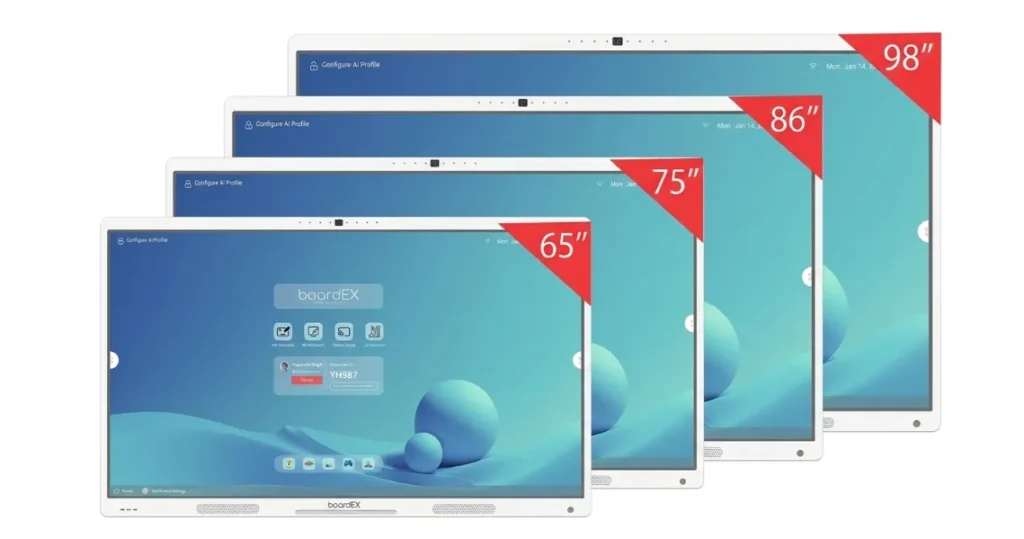
The right interactive flat panel size is decided by one measurement: the distance from the screen to the farthest seat. Divide that distance by six to get the minimum screen height you need, then match it to a diagonal. In practice, this interactive flat panel size guide puts a 65-inch panel in rooms up to about 4.9 meters deep, 75-inch at 5.6 meters, 86-inch at 6.4 meters, and 98-inch at 7.3 meters. Everything else, ceiling height, lighting, touch use, and content type, adjusts that starting answer rather than replacing it.
Table of Contents
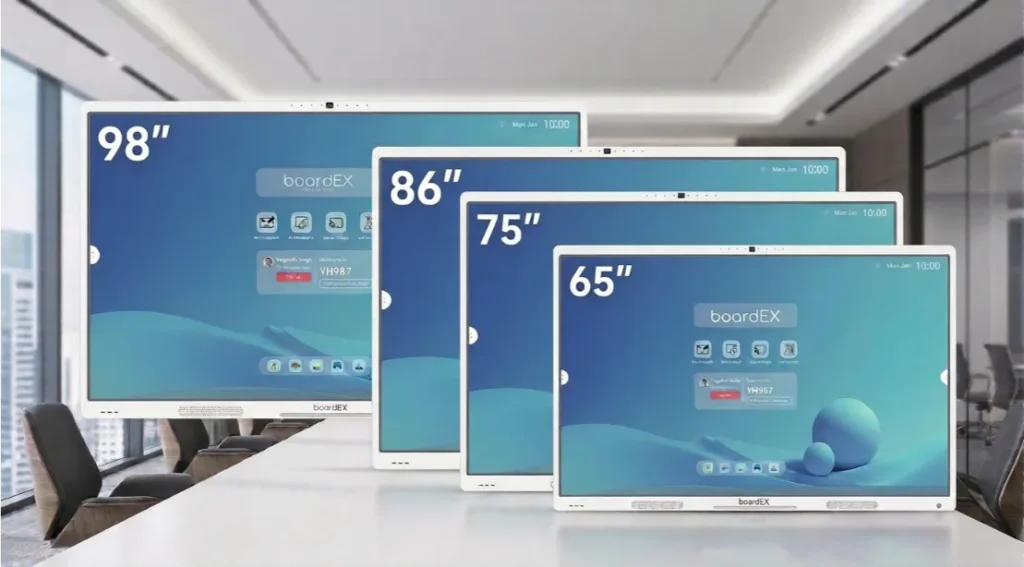
Understanding Standard Interactive Flat Panel Sizes
Interactive flat panels are sold by diagonal measurement in a 16:9 format, which means the diagonal alone does not tell you how much usable screen height you get. Screen height is what governs legibility at a distance, so it is the number worth knowing before anything else.
| Size | Screen width | Screen height | Typical room |
|---|---|---|---|
| 65 inch | 143.9 cm | 80.9 cm | Small classroom, huddle room, clinic bay |
| 75 inch | 166.0 cm | 93.4 cm | Standard classroom, mid-size meeting room |
| 86 inch | 190.4 cm | 107.1 cm | Large classroom, standard boardroom, training hall |
| 98 inch | 217.0 cm | 122.0 cm | Lecture hall, large boardroom, sales center |
Two points catch buyers out. Moving from 86-inch to 98-inch adds only 15 cm of height but 27 cm of width, so the constraint is usually the wall, not the ceiling. And the jump from 65-inch to 75-inch is the single best value step in the range, because it adds meaningful reach for a modest price difference. The four sizes above are what boardEX supplies across the full boardEX interactive flat panel range in Saudi Arabia.
Room Size and Viewing Distance Calculations
Panel size should be matched to the farthest viewer, never to the available wall space. A screen that is too small does not fail for everyone at once. It fails quietly for the back two rows, who stop reading and start disengaging, which is exactly the outcome the purchase was meant to prevent.
Maximum viewing distance = screen height x 6
| Size | General viewing (6x height) | Detailed content (4x height) |
|---|---|---|
| 65 inch | 4.9 m | 3.2 m |
| 75 inch | 5.6 m | 3.7 m |
| 86 inch | 6.4 m | 4.3 m |
| 98 inch | 7.3 m | 4.9 m |
Worked example:
A classroom measures 7 meters from the front wall to the back row. Seven divided by six gives 1.17 meters of screen height, which lands between the 86-inch and 98-inch panels. Since the calculation exceeds what an 86-inch delivers, 98 inches is the correct choice for that room. Rounding down here is the most common and most expensive mistake, because the fix later is a full replacement rather than an adjustment.
Ceiling Height Considerations
Ceiling height rarely decides the size on its own, but it decides whether the size you chose can be mounted at a usable height. Total wall height required is the panel height plus the mounting height off the floor, and the panel frame adds roughly 5 cm to the screen height in the table above.
Standard Ceiling Heights (2.4 m to 3 m / 8 to 10 ft)
All four sizes fit comfortably. With the bottom edge at 90 cm, a common height that keeps the writing surface reachable for both a teacher and a seated participant, a 98-inch panel tops out around 2.17 meters, leaving clearance under a 2.4-meter ceiling. This is the most common ceiling range in Saudi schools and offices, and it imposes no real limit.
High Ceilings (over 3 m / 10 ft)
High ceilings tempt installers to mount high, which is the wrong instinct. Mounting above roughly 1.2 meters at the bottom edge puts the top of a large panel outside comfortable reach and forces users to look up, which becomes tiring across a full lesson or a long meeting. Keep the mounting height the same as a standard room and accept the empty wall above it. Lecture halls with tiered seating are the exception, since the seating itself raises the sightline.
Low Ceilings (under 2.4 m / 8 ft)
Low ceilings are where 98-inch stops being practical. Once you subtract a workable mounting height, there is not enough wall left, and dropping the panel lower to compensate puts the bottom of the screen below desk level where front row participants block it. In these rooms, 86 inches is usually the ceiling in both directions, and two smaller panels side by side can outperform one oversized screen.
User Interaction Requirements
How people touch the panel matters as much as how far they sit from it.
Touch-Heavy Applications
Some rooms use the screen constantly: students writing at the board, design reviews, hands-on training. Here size can work against you. A 98-inch panel is 2.17 meters wide, which is wider than one person’s arm span, so reaching the far corners means walking to them.
Young children make this harder. A panel hung at adult height leaves the top third out of reach for primary students, a point worth checking early when sizing panels for schools across Saudi Arabia.
Best fit: 75-inch or 86-inch.
Presentation-Focused Use
If the panel mostly displays content and nobody writes on it much, reach stops being a problem. Only legibility matters. Follow the viewing distance formula, and go one size up if the budget allows.
Best fit: the largest size your room and wall can take.
Collaborative Work
When several people write at once, you need width. Each person needs roughly 80 cm of space to work without bumping elbows. Touch points matter too: a 40-point panel supports real group work, while a 10-point panel starts dropping input.
Best fit: 86-inch for two users, 98-inch for three or more.
Content Type Analysis
The same room can need different sizes depending on what appears on screen, which is why the four times rule exists alongside the six times rule.
Text Heavy Content
Documents, spreadsheets, and code need the tighter four times limit. Arabic content deserves specific attention here. Diacritics and the shorter x-height of Arabic script mean Arabic text at a given point size is harder to read at a distance than the equivalent Latin text, so bilingual rooms should size for the Arabic, not the English. This is a routine finding in Saudi installations and one that a purely English sizing chart will miss.
Visual and Multimedia Content
Video, images, diagrams, and slide decks tolerate the full six times distance. Photography, laboratory imaging, and design work benefit more from a bright 4K panel with anti-glare glass than from an extra size tier, so resolution and brightness deserve the budget before diagonal does.
Data Visualization
Dashboards, floor plans, master plans, and control room feeds are the hardest case, because they combine small text with detail that people walk up to examine. Size for the four times rule and expect users to approach the screen. Rooms of this kind are usually where 98 inches earns its cost.
Budget and Space Constraints
Budget Limitations
If money is tight, protect the screen size first and cut the extras. You can add a stand, a camera, or a software license next year. You cannot make a small panel bigger.
Most buyers want a sense of what an interactive flat panel costs in Saudi Arabia before they settle on a size tier.
Rule: right size with fewer extras beats wrong size with a full package.
Physical Space Restrictions
Measure the usable wall, not the full wall. These things eat into it:
- Light switches and power points
- Fire alarm panels
- Whiteboard rails
- Air conditioning outlets
- Door swings
Rule: leave at least 15 cm clear on each side for the mount and for cable access during service visits.
Future Flexibility
Rooms change purpose faster than panels get replaced. A school adds hybrid classes. An office turns a meeting room into a training room. The screen ends up doing more than the original brief asked for.
If your calculation sits between two sizes, take the larger one. A panel stays in place for five to seven years, and that is a long time to live with a screen that is slightly too small.
For rooms with no fixed purpose yet, a mobile trolley stand rather than a fixed wall mount keeps your options open. Check the stand’s load rating against the panel weight before ordering.
Rule: when in doubt between two sizes, size up.
Making the Final Decision
- Run these five steps with a tape measure, and the answer usually settles itself.
- Measure from the intended screen position to the farthest seat.
- Divide by six for general viewing, or by four if the room shows text-heavy or detailed content.
- Match the resulting screen height to a diagonal in the table above, rounding up rather than down.
- Check the usable wall width and the ceiling clearance against that size.
- Adjust for touch use, Arabic legibility, and how the room is likely to be used in three years.
Conclusion
Sizing an interactive flat panel is a measurement exercise before it is a budget exercise. Establish the distance to the farthest seat, apply the six times rule, and treat ceiling height, touch use, content type, and lighting as adjustments to that figure rather than as competing criteria. Rounding up at the boundary costs less over a panel life than replacing an undersized screen two years in. When the room is measured and the shortlist is down to one or two sizes, book a free room survey and the specification can be confirmed on site.
Frequently Asked Questions
What size interactive flat panel is best for a standard classroom?
For a standard Saudi classroom of 25 to 35 students with a back row around 5.5 meters from the board, a 75-inch interactive flat panel is the balanced choice. Deeper classrooms reaching 6.4 meters need an 86-inch, and rooms beyond that need a 98-inch.
How do I calculate the right interactive flat panel size for my room?
Measure the distance from the screen position to the farthest seat and divide it by six to get the minimum screen height required. Match that height to a diagonal: 80.9 cm for 65 inches, 93.4 cm for 75 inches, 107.1 cm for 86 inches, and 122.0 cm for 98 inches. For text-heavy or detailed content, divide by four instead of six.
Is a 98-inch interactive flat panel too big for a normal room?
A 98-inch panel needs a back row of at least 4.9 meters to justify its size, a usable wall width of around 2.5 meters including clearance, and a ceiling of 2.4 meters or more. In smaller rooms, it is oversized, harder to mount, and no easier to read than an 86-inch panel.
What is the difference between 86-inch and 98-inch interactive flat panels?
A 98-inch panel adds 15 cm of screen height and 27 cm of width over an 86-inch, extending the maximum viewing distance from 6.4 meters to 7.3 meters. The extra width is usually the deciding factor, both for collaborative work at the board and for whether the panel physically fits the available wall.
Does Arabic content change the panel size I need?
Yes. Arabic script carries diacritics and a shorter x-height than Latin text, so it becomes hard to read at a distance sooner. Bilingual rooms should be sized against the Arabic content rather than the English, which often means moving up one size tier from what an English-only calculation suggests.