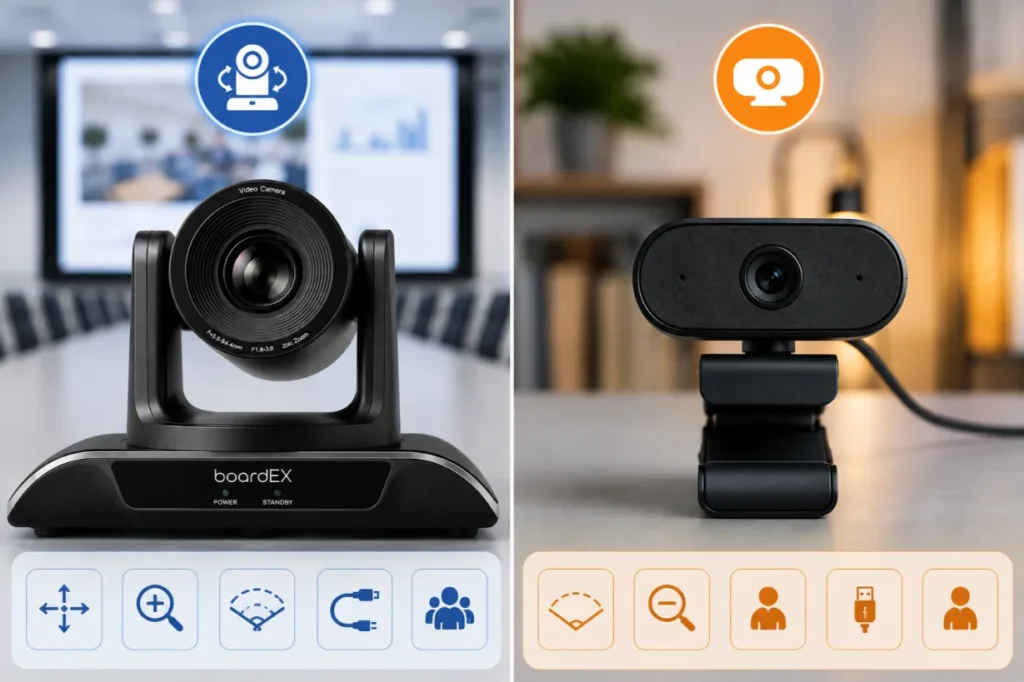
In the PTZ camera vs webcam decision, the deciding factor is room depth, not budget. A webcam is the better choice when everyone sits within roughly 3 metres of the screen, and no more than four people join from the room. Beyond that distance, or once people move around, a PTZ camera wins because optical zoom and motorised movement keep faces readable instead of turning participants into small shapes at the back of the frame. Most Saudi offices need both: webcams at desks, PTZ cameras in shared rooms.
Table of Contents
What is the difference between a PTZ camera and a webcam?
A webcam is a fixed camera. The lens does not move, the field of view is set at manufacture, and any zooming is digital, meaning the image is cropped and enlarged rather than genuinely magnified. It connects over USB and is designed to sit on a monitor at arm’s length from one person.
A PTZ camera is a motorised camera. PTZ stands for pan, tilt and zoom, and each of those movements is driven by internal motors rather than by someone physically nudging the device. The optical zoom uses real glass elements, so a face captured at 8 metres holds detail that a cropped webcam image loses completely. The Vision Pro PTZ camera range built for conference room use pairs that optical assembly with 4K output, which matters more in a wide room than it does at a desk.
The short version: a webcam frames a person, a PTZ camera covers a room.
PTZ camera vs webcam: full comparison
| Factor | PTZ camera | Webcam |
| Output resolution | Typically 1080p to 4K, often at 60fps | Typically 1080p, some 4K models at 30fps |
| Zoom type | Optical, real magnification with no detail loss | Digital, a crop of the existing sensor image |
| Field of view | Adjustable through pan and tilt, effectively unlimited within the room | Fixed, usually 65 to 120 degrees |
| Speaker tracking | AI auto framing and presenter tracking on most current models | Software framing only, limited to cropping within the fixed frame |
| Control | Remote handset, software preset recall, or automated | None, the camera is aimed by moving the laptop |
| Mounting | Wall bracket, ceiling mount, or above the display | Monitor clip or small desk stand |
| Connectivity | USB 3.0 and HDMI, frequently both at once, IP output on higher models | USB only |
| Usable room depth | Comfortable up to 10 to 12 metres with optical zoom | Reliable to about 3 metres |
| Audio | Usually none, an external microphone array is expected | Built-in microphone, adequate for one person |
| Purchase cost | Higher, positioned as room infrastructure | Low, positioned as a personal accessory |
| Expected service life | Five years or more, motors are the wearing part | Two to three years in daily use |
| Installation | Bracket, cable run and configuration required | Plug in and open the meeting app |
How far can each camera actually see?
This is the question almost no buying guide answers, and it settles the argument faster than any feature list. What matters is not whether a camera can technically capture a large room, but whether a remote participant can read the expression on the face of the person speaking.
Use these distance bands as a working rule when specifying a room:
| Distance from camera to furthest participant | Recommended camera | Why |
| Up to 1.5 m (single desk) | Webcam | The fixed wide lens already fills the frame with one face |
| 1.5 m to 3 m (huddle room, 2 to 4 people) | Webcam with a wide field of view | A 120-degree lens covers a small table without distortion at the edges |
| 3 m to 6 m (standard meeting room, 6 to 10 people) | PTZ camera | Faces at the far end start losing detail on a fixed lens; optical zoom recovers it |
| 6 m to 12 m (boardroom, training room, lecture hall) | PTZ camera with higher optical zoom | Only real optical magnification keeps a speaker legible at this range |
| Beyond 12 m (auditorium, town hall) | Multiple PTZ cameras with preset switching | One camera cannot hold both the stage and the audience usefully |
Measure the room before choosing the camera. A surprising number of Riyadh offices buy a premium webcam for a 7 metre boardroom, then blame the platform when remote colleagues complain they cannot tell who is talking.
Does a webcam still make sense in 2026?
Yes, and honest advice matters more here than an upsell. A webcam remains the correct specification in three situations.
The first is the individual workstation. One person, one screen, one face in the frame. A PTZ camera on a desk is wasted engineering, and its motors add nothing when the subject never moves out of shot.
The second is the huddle room. Two to four people around a small table within 3 metres of the display will be captured perfectly well by a wide-angle webcam, and the built-in microphone will usually cope at that range. Adding motorised optics to a room that size buys no visible improvement.
The third is temporary or mobile setups. Training rooms that get reconfigured weekly, pop-up interview spaces and site offices benefit from a device that travels in a laptop bag and needs no bracket, no cable run and no commissioning visit.
Field observation from boardEX installations: the most common mistake is not choosing the wrong camera; it is fixing the wrong problem. When remote participants say they cannot follow a meeting, the cause is more often unusable audio from a laptop microphone at 5 metres than it is picture quality. Solve the microphone first, then decide on the camera.
When a meeting room needs a PTZ camera instead
Four room patterns push the decision firmly toward PTZ.
The long boardroom. A rectangular table with people down both sides means the far end is often double the distance of the near end. A fixed lens exposes for the whole frame and gives the far end no priority. A PTZ camera can be pre-set to frame the head of the table, the whole table, or the presentation wall, and switch between them in one button press.
The training room with a moving presenter. Anyone who walks while they speak will step out of a fixed frame within seconds. Auto framing follows them instead. Rooms built around an interactive flat panel for corporate offices almost always have a presenter standing beside the display rather than sitting at a laptop, which is exactly the case a webcam handles worst.
Rooms recorded as well as streamed. If sessions are archived for compliance, onboarding, or later review, the recording is watched by people who were not in the room. They rely entirely on the camera to know who is speaking, and a static wide shot makes that guesswork.
Bilingual meetings. In Saudi offices where discussion moves between Arabic and English, remote participants read lips and expressions far more than most people realise, particularly when audio quality dips. Legible faces are an accessibility requirement in bilingual rooms, not a luxury.
What an AI conference camera adds beyond auto framing
Auto framing is the feature everyone names, but it is only the entry point. An AI conference camera in a well-specified room does four distinct things.
- Group framing counts the people present and tightens the shot so the frame is filled by participants rather than empty wall and ceiling.
- Speaker tracking shifts the frame to whoever is talking, usually with a deliberate delay so that a short interjection does not throw the camera around the room.
- Presenter mode locks onto one person and follows them along a defined zone, ignoring seated participants who move.
- Preset recall stores fixed positions such as the whiteboard, the head of the table or the panel, so a meeting host can jump to a known angle instantly rather than steering manually.
The practical value is that nobody has to operate the camera. In rooms without an AV technician, which is nearly all of them, an unattended camera that frames itself sensibly is worth more than a higher specification camera that needs a person driving it.
PTZ camera for school and hybrid classroom use
Education rooms follow the same distance logic as meeting rooms, with one difference: teachers move constantly, so tracking behaviour carries more weight than raw resolution. A classroom video conferencing camera needs to hold the teacher in frame while they walk between the board and the desks, and it needs to do so without the visible hunting motion that distracts students in the room.
The comparison that matters in schools is usually not against a webcam at all. It is against a simpler mounted alternative, and the trade-offs in that PTZ camera vs fixed camera in classrooms decision run differently, because a small classroom with a stationary teacher genuinely does not need motorised optics.
Where a hybrid classroom camera is justified, the specification bar sits higher than the corporate one on tracking smoothness and low-light performance, since panels and projector screens are often used in partially dimmed rooms. That makes the checklist of classroom PTZ camera features a stricter test than anything a boardroom would apply.
Setup and connection realities buyers miss
Three constraints derail more installations than any specification shortfall.
USB cable length
USB 3.0 is only rated for reliable passive runs of around 3 metres. A PTZ camera mounted above a display at the front of a room, connected to a laptop at the far end of the table, exceeds that immediately. The fix is an active USB extender or an HDMI output routed to a room system, and it needs to be specified at the design stage rather than discovered on installation day.
Mounting height
A camera mounted too high looks down on the tops of heads and flattens facial expression. Aim for roughly eye level of a seated participant, which in most rooms means just above or just below the display rather than near the ceiling. Ceiling mounts should be reserved for rooms where nothing else is possible.
Upload bandwidth
A 4K camera is only useful if the connection carries the stream. Most conferencing platforms cap shared streams well below 4K regardless of the camera, so the benefit of a higher resolution sensor is mainly in the cropping headroom it gives the framing algorithm and in local recording quality. Check the uplink allocation per room before paying for resolution that will be compressed away.
Five-year cost picture
Comparing purchase prices alone flatters the webcam. Compare the cost drivers across a five-year window instead.
| Cost driver | PTZ camera | Webcam |
| Replacement cycle | Rare, motors and firmware are the limiting factors | Frequent, personal devices are handled, moved and lost |
| Units per room | One, serving everyone present | One per participant if people join individually from their laptops |
| Installation | One-off bracket, cabling and commissioning | None |
| Ongoing support | Occasional firmware updates and preset adjustments | Repeated driver and compatibility issues across mixed laptops |
| Meeting time lost | Low, the room is always ready | Higher, setup happens at the start of every session |
Which should you choose?
- Personal desk or home office: webcam.
- Huddle room, up to four people within 3 metres: wide-angle webcam plus a separate speakerphone.
- Standard meeting room, six to ten people: PTZ camera with auto framing.
- Boardroom or long table beyond 6 metres: PTZ camera with higher optical zoom and stored presets.
- Training room or lecture hall with a moving presenter: PTZ camera with presenter tracking.
- Auditorium: multiple PTZ cameras with switching.
Most organisations end up running both. The question is rarely which device is better in the abstract, only which one belongs in the room being specified.
Specify the right camera for your room
boardEX supplies, installs and supports conference room cameras and interactive displays across Riyadh, Jeddah, Dammam and Khamis Mushayt, with a site survey before anything is quoted.
Frequently asked questions
What is the best camera for online meetings?
There is no single best camera, because the correct answer depends on how far the furthest participant sits from the screen. For one person at a desk, a 1080p webcam is the best camera for online meetings, and anything more is wasted. For a room where people sit more than 3 metres away, a PTZ camera with optical zoom and auto framing is the better choice, because a webcam physically cannot magnify a distant face without losing detail.
Is a PTZ camera worth it for a small meeting room?
Usually not. In a room under 3 metres deep seating four people or fewer, a wide-angle webcam captures the table adequately, and the motorised movement of a PTZ camera adds no visible benefit. The money is better spent on a dedicated microphone, since audio quality limits small-room meetings far more often than picture quality does.
Can a PTZ camera completely replace a webcam?
In a shared room, yes. At an individual desk, no. A PTZ camera is designed to be mounted, cabled, and left in place to serve whoever enters the room, whereas a webcam is a personal device that travels with a laptop. Organisations typically deploy PTZ cameras in shared rooms and keep webcams for individual workstations rather than standardising on one type.
Do PTZ cameras work with Microsoft Teams and Zoom?
Yes. A PTZ camera connected over USB is recognised as a standard video device, so it appears in the camera list in Teams, Zoom, Google Meet and Webex with no additional software. Pan, tilt and zoom control is handled by the camera remote or its own utility rather than inside the meeting app, and tracking features run on the camera itself, which means they work identically across every platform.
Is a PTZ camera for meetings the same as a PTZ security camera?
No, and the two should not be substituted for each other. Both pan, tilt and zoom, but a conferencing PTZ camera is built for close-range colour accuracy, smooth framing motion and USB or HDMI output into a computer, while a security PTZ camera prioritises long-range surveillance, weatherproofing, infrared night vision and continuous recording to a network video recorder. A security model connected to a meeting room will typically deliver poor skin tones, awkward framing and no straightforward conferencing output.