Table of Contents
If your teachers mainly use a whiteboard, a browser, YouTube, casting, and Android apps, the built-in Android system is enough and keeps things simple. Add a Windows OPS module only in rooms where someone has to run Windows software on the board itself, such as a computer lab, an engineering class, or a teacher who lives in desktop PowerPoint.
Most schools do not need to pick one for the whole building. The smarter question is which rooms need Windows, and this guide helps you work that out.
Android vs OPS at a glance
The table below uses the boardEX RK-10-PRO interactive flat panel as the example, since that is the model most Saudi schools ask us about.
| Feature | Built-in Android | Windows OPS module (optional) |
|---|---|---|
| What it is | The operating system already inside the panel | A small Windows PC that slides into a slot at the back of the panel |
| On the RK-10-PRO | Android 14, quad-core A73 processor, 8GB RAM, 128GB storage | Windows 11, Intel Core i5 or i7 (12th Gen), 8GB DDR4 RAM, 256GB SSD (expandable) |
| Touch points | 20 | 40 |
| Runs | Whiteboard, browser, Android apps, wireless casting, video calls | Full Windows desktop software, plus everything you can do in a browser |
| Day-to-day effort for IT | Low | Higher: Windows updates, antivirus, user accounts |
| Best fit | Most classrooms, KG to intermediate, lecture rooms | Computer labs, technical subjects, rooms that must act as a full PC |
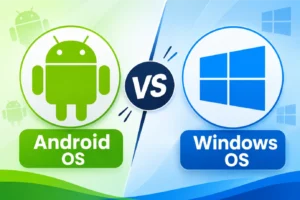
What is the difference between Android and OPS on an interactive panel?
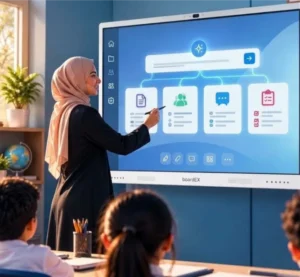
Android is the system that is already built into the panel. Switch the board on, and it boots straight into Android, with the whiteboard app, a browser, and the casting tools ready to use. No PC is involved.
OPS stands for Open Pluggable Specification, a slot standard originally defined by Intel. An OPS module is a complete mini computer, about the size of a hardback book, that plugs into a slot behind the screen. Once it is in, the panel can show Windows as one of its input sources, the same way it would show a laptop connected by HDMI, except there is no laptop and no cable across the classroom floor.
So the choice is less “Android or Windows” and more “Android only, or Android with Windows added”. A panel with an OPS slot still keeps its Android system. You are adding a second option, not replacing the first.
What can the built-in Android system handle in a classroom?
More than most people expect. On the RK-10-PRO, the Android side covers the things teachers do every single lesson:
- Writing and drawing on the boardEX AI Whiteboard and boardEX Write
- Opening websites and browser-based platforms, including cloud tools like Google Docs or Microsoft 365 online
- Playing lesson videos
- Casting a teacher’s phone or laptop to the board with K-Share
- Joining Zoom, Microsoft Teams or Google Meet calls
- Using the built-in teaching tools such as 3D Labs, STEM simulations, active learning games and AI questions generated from a textbook
For a typical primary or intermediate classroom, that list is the whole job. Teachers get a board that turns on fast, has nothing to log into, and is hard to break.
Where Android hits a wall is desktop software. If a programme only exists as a Windows .exe file, Android cannot run it, however good the panel’s hardware is.
When does a school actually need Windows OPS?
You need OPS when a lesson depends on software that only runs on Windows and the teacher wants to run it on the board itself, not on a separate laptop. In Saudi schools and universities, the common cases are:
- Computer labs and coding classes using Windows-only tools such as the Arduino IDE, Visual Studio, or Scratch Desktop
- Engineering and design subjects where AutoCAD, SolidWorks or similar programmes are part of the curriculum
- Older curriculum or publisher software supplied on disc or as a Windows installer
- Exam and assessment tools that need a locked-down Windows browser
- Teachers who build heavy desktop PowerPoint lessons with animations, embedded media and add-ins that do not behave the same way in the browser or Android versions
- Universities and training centres where the board in a lecture hall replaces the lecturer’s PC entirely
There is also an IT reason. If your school already manages all its computers through Windows tools and Active Directory accounts, an OPS module lets the board sit inside that same system. Some IT managers prefer this even when the software list does not strictly require it.
If none of the points above describe the room, OPS is likely to be money spent on a PC that sits idle.
Can one interactive panel run both Android and Windows?
Yes, if the panel has an OPS slot and you install a module. The two systems run separately. The teacher switches between them from the input menu or remote, much like switching TV channels. Files do not automatically move between the two, so a lesson saved in Windows is not sitting in the Android whiteboard, and the other way around. Cloud storage is the easiest bridge. The RK-10-PRO includes 15GB of AI cloud storage for this.
Android or OPS: a room-by-room guide for Saudi schools
Instead of one answer for the whole school, decide per room.
| Room or user | Our usual recommendation | Why |
| Kindergarten and primary classrooms | Android only | Whiteboard, videos, games, and casting cover the day. Fewer things to go wrong. |
| Intermediate and secondary classrooms | Android, with an OPS slot available | Most lessons are browser and app-based. Keep the slot so a module can be added later. |
| Science labs | Android, OPS only if simulation software is Windows-only | The built-in 3D Labs and STEM simulations may be enough. Check the lab’s own software first. |
| Computer and coding labs | OPS | Programming tools and desktop software need Windows. |
| Engineering, design, technical colleges | OPS | CAD and engineering software is Windows-based. |
| University lecture halls | OPS in most cases | The board often replaces the lecturer’s PC, and lecture capture software usually runs on Windows. |
| Staff rooms and meeting rooms | Android | Casting a laptop and video calls are the main uses. |
| Training centres | Depends on the course | Software training needs OPS. Soft-skills training does not. |
The software check every school should do first
Before comparing prices, ask each department head to fill in a short list. It takes one staff meeting, and it will decide the answer for you.
| Question | Example answer | What it tells you |
|---|---|---|
| Which software do you open on the board every week? | Whiteboard, YouTube, Google Slides | Android is fine |
| Does any of it only install on Windows? | Arduino IDE, AutoCAD | That room needs OPS |
| Does it work in a web browser instead? | Yes, the online version | Android can handle it |
| Is there an Android app version? | Yes, on Google Play | Check the panel’s app access |
| Do teachers bring their own laptops anyway? | Yes, every lesson | Casting over K-Share may make OPS unnecessary |
| Does IT need to manage the board with the school’s Windows tools? | Yes | Lean toward OPS |
If only two or three rooms come back with a Windows-only answer, you now know exactly where your OPS budget should go.
How do cost and maintenance compare?
The Android system is already part of the panel price, so it adds nothing. An OPS module adds the cost of the module itself, plus a Windows licence if it is not bundled. Prices depend on the processor (i5 or i7), storage, and quantity, so ask for a quotation per configuration rather than relying on a general figure.
The bigger difference over five years is maintenance:
- Android panels need occasional firmware updates and very little else. Through Airgo DMS, IT can manage a group of boardEX panels from one place, which matters once you have dozens of classrooms.
- OPS modules are Windows PCs. They need Windows updates, antivirus, user accounts, and the same care as any school computer. The upside is that when the module gets old, you can swap it for a newer one without replacing the whole screen.
For a school with a small IT team, every OPS module is one more PC to look after. That is the honest trade-off.
A practical plan: buy the slot, add the module where it is needed
For most Saudi schools, we suggest this approach:
- Choose panels that have an OPS slot, like the RK-10-PRO, for every classroom.
- Order OPS modules only for the rooms that failed the software check, usually labs and technical classrooms.
- Run everything else on Android from day one.
- If a department later adopts Windows software, add a module to that room. The panel stays in place.
This keeps the first-year budget lower, keeps IT work manageable, and avoids the most common mistake we see: buying a Windows PC for every classroom when only a handful of teachers ever open it.
What to ask your supplier before you order
Put these questions in writing and ask for the answers in the quotation itself:
- Which Android version ships on the panel, and how long will it receive updates?
- What are the exact processor, RAM, and storage figures for both the Android system and the OPS module?
- Is the Windows licence included with the OPS module?
- Is the OPS slot a standard 80-pin slot, or does it only accept the supplier’s own modules?
- Does adding or replacing an OPS module affect the panel’s warranty? (The RK-10-PRO carries a 3-year warranty.
- Who installs the panels, who trains the teachers, and who comes on site when something stops working?
- Can we see a demo of the exact model and configuration we are buying?
A 10-minute test to run at the demo
Specifications on paper only tell part of the story. At the demo, try this:
- Open the whiteboard on Android and write with two pens at once. Check palm rejection.
- Open a browser tab with your school’s own learning platform and a lesson video.
- Cast a teacher’s phone to the board.
- Switch to the OPS input and open the one Windows programme your lab depends on.
- Switch back to Android and see how long it takes.
- Ask a teacher, not the IT manager, to repeat steps 1 to 3 without help.
If the teacher manages step 6 easily, you have the right setup.
Request a Quote or Book a Demo
Frequently asked questions
Is an OPS interactive panel better than Android for schools?
Not by default. OPS is better only in rooms that need Windows software on the board. For general classrooms, Android is simpler, cheaper, and easier for teachers to use.
Do I need to buy the OPS module on day one?
No. If the panel has an OPS slot, you can add the module later, room by room, when a real need appears.
Can students use the board at the same time on Android?
Yes. The RK-10-PRO supports 20 touch points on Android, which is enough for several students writing together. With the OPS module, it supports 40.
Can I use Microsoft Teams or Zoom without OPS?
Yes. The RK-10-PRO works with Zoom, Microsoft Teams, and Google Meet. An external camera and microphone are optional add-ons.
Will Android run Microsoft PowerPoint?
You can open and present PowerPoint files through Microsoft 365 online or the Android app. Complex desktop presentations with add-ins or heavy animations run more reliably on the Windows OPS module.
Does the OPS module make the panel faster?
It adds a second, more powerful computer for Windows work. It does not change how the Android side performs.
Not sure which setup fits your school?
Send us your software list or tell us which rooms you are equipping, and the boardEX team will recommend an Android or OPS configuration per room, with a matching quotation. We can also arrange a live demo of the RK-10-PRO in Riyadh, Jeddah, or Dammam.