A face recognition attendance system lets a teacher mark the class present by scanning students’ faces with a camera, instead of reading out names. In most Saudi schools, that means one of two setups: a terminal at the school gate, or a camera inside the classroom.
This guide is for principals, school administrators, and IT teams deciding between them. It covers how the technology works, how multiple face recognition marks a whole class at once, what the PDPL means for students’ face data, and a rollout plan you can run in one class before committing the whole school.
Table of Contents
What Is a Face Recognition Attendance System for Students?
It is software that matches a live camera image of a student against a face profile saved earlier, then records that student as present with the date and time.
The system does not need a student to carry anything. No card to forget, no fingerprint reader to queue at. The face is registered once, and every scan after that is a comparison against the saved profile.
Most systems store a face template rather than a photo. A template is a set of measurements that describes the face, which the system can compare but which is not meant to be viewed like a picture. Whether a given product stores photos, templates, or both is one of the first questions to ask a vendor.
Schools are not starting from zero here. The Ministry of Education’s Hudoori app already verifies teachers’ attendance biometrically, using a voiceprint and also supporting face and fingerprint. Using the same idea for students is a bigger step, because the data belongs to children.
How a Face Recognition-Based Attendance System Works in the Classroom
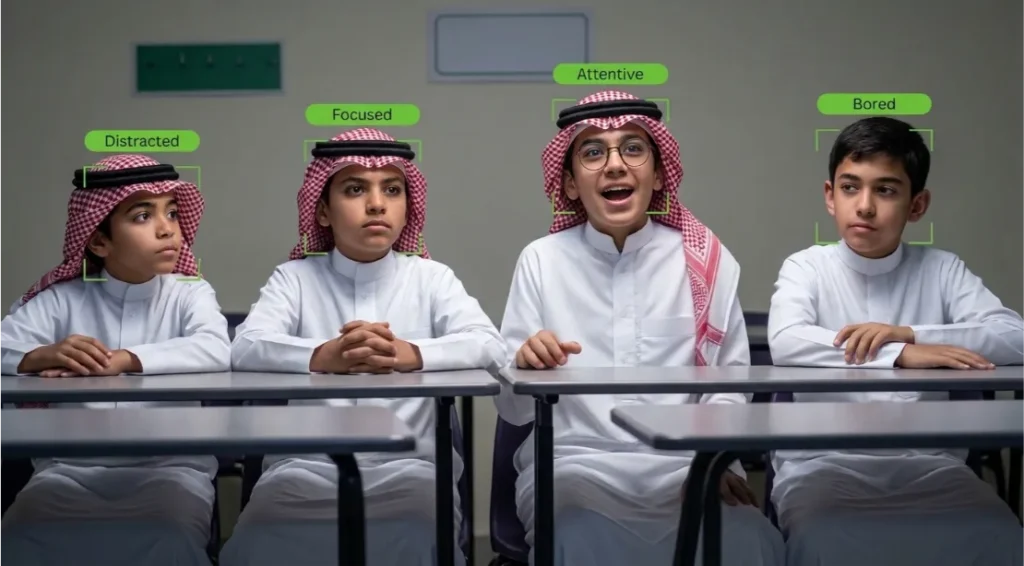
Every face recognition-based attendance system follows the same pattern: register once, scan many times. Here is how it runs on a boardEX interactive panel with AI Attendance, where the camera is built into the panel the teacher already uses.
Step 1: Set up the class
The teacher adds the class and their own details on the panel, then opens the Attendance option.
Step 2: Register each student once
For a new student, the teacher enters the name and captures the face from several angles: front, left, and right. Students rarely look straight at a camera during a busy lesson, so side angles help the system recognise them when they turn their head.
Step 3: Take attendance each lesson
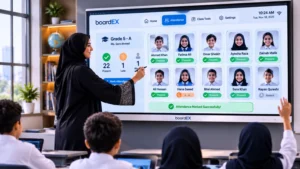
The teacher selects Take Attendance (Mark Attendance) and scans the room with the panel camera. Recognised students are marked present.
Step 4: Check and save
The teacher looks over the list, corrects anything the camera missed, and saves. What happens to the record next, such as export or reports, depends on the school’s set-up.
Multiple Face Recognition Attendance: Marking a Whole Class in One Scan
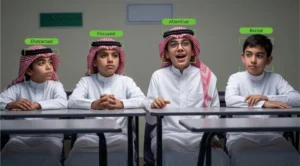
Multiple face recognition attendance means the camera identifies several students in the same frame, instead of one person at a time. This is the feature that makes classroom attendance practical. A gate terminal can process students one after another as they walk in; a classroom of 25 seated students needs a camera that can pick out many faces at once.
boardEX AI Attendance supports group attendance, so the teacher can mark several registered students together in one scan.
School Attendance Methods Compared: Roll Call, Cards, Fingerprint, and Face Recognition
The real choice for most schools is not “face recognition or not”. It is where attendance is taken: once at the gate, or in every lesson.
| Method | Where it records | Per-lesson attendance? | Extra hardware | Main weakness |
| Paper or app roll call | Classroom | Yes | None | Takes teaching time every period; entry mistakes |
| ID or RFID cards | Gate or classroom reader | Only with a reader in each room | Cards + readers | Cards get lost, forgotten, or swapped between students |
| Fingerprint scanner | Gate | Rarely; queues form | Scanners | Slow for large groups; one shared touch surface |
| Face recognition gate terminal | Gate | No: shows arrival, not presence in class | Terminals at entrances | A student can arrive and still miss a lesson |
| Face recognition on the classroom panel | Classroom | Yes | None if the panel has a camera | Depends on camera position, lighting and class size |
Gate terminals answer “did the student come to school?” Classroom attendance answers “was the student in this lesson?” Many schools need both, and the two can work together.
Benefits of a Smart Attendance System with Face Recognition
Teaching time back
This is the benefit schools feel first. Work it out for your own timetable rather than trusting a vendor’s headline number:
- Time how long a roll call takes in one class today, in minutes.
- Multiply by periods per day.
- Multiply by teaching days in the school year.
That total, per class, is the most a faster scan could save. Run the same calculation after a two-week trial to see the real difference.
Attendance for every lesson, not just the morning
When attendance happens on the classroom panel, the school gets a record per period. That is how a student who arrives at 7:00 but skips the fourth lesson shows up in the data.
Fewer manual errors
The teacher confirms a scan instead of ticking names on a list. That removes most mistyped or skipped entries, provided teachers still check the list before saving.
No new device on the wall
On a boardEX panel, the camera is already there. Standalone terminals need to be bought, mounted, cabling, and maintaining at every entrance.
Harder to fake
A classmate cannot answer “present” for an absent friend, and there is no card to lend.
How to Roll Out Face Recognition Attendance in Your School
Start small. One class for two weeks tells you more than any brochure.
- Pick one pilot class with a teacher who is comfortable with the panel.
- Send the parent letter and collect replies before registering anyone.
- Register students in one session, front, left, and right angles each. Budget a lesson for it.
- Run both methods for two weeks: face scan plus the usual roll call. Compare the two lists every day.
- Record the misses: who was not recognised, and why (lighting, angle, seating, head covering).
- Decide, then expand class by class, not the whole school in one week.
Hijab, niqab and face coverings
This comes up in almost every Saudi school, and it deserves a clear answer before rollout, not after. Ask the vendor directly how registration and recognition work for students who wear a hijab or niqab.
Whatever the answer, plan a respectful fallback: for example, a female staff member confirms attendance for students who prefer not to be scanned. No student should have to uncover her face for an attendance system.
Keeping profiles up to date
Children’s faces change as they grow. Plan to refresh registrations, for example, at the start of each school year.
Frequently Asked Questions About Face Recognition School Attendance
Is face recognition attendance allowed in Saudi schools?
The PDPL treats biometric data as sensitive, so schools need a lawful basis (usually consent), clear notice to parents, and proper safeguards. Confirm your school’s position with a legal adviser before rollout.
Can a face recognition system mark several students at the same time?
Yes, if it supports multiple face recognition. boardEX AI Attendance supports group attendance, so several registered students can be marked in one scan.
Do we need to buy a separate camera?
Not with boardEX AI Attendance. It uses the camera built into the interactive panel.
How long does it take to register a student?
Each student is registered once, with the face captured from a few angles, such as front, left, and right. Plan one lesson to register a full class.
Is the interface available in Arabic?
Yes, the interface is also available in Arabic.
What happens if a student is not recognised?
The teacher marks the student by hand and saves. A good system lets the teacher correct the list before it is final.
See Face Recognition Attendance Running in Your Own Classroom
boardEX AI Attendance works on the interactive panel your teachers already use: register each student once, then mark the class in a single scan. We can show registration, group attendance, and the data settings in one of your classrooms.
Book a demo or see the boardEX interactive flat panels that run it. For more on classroom AI, read AI in Saudi classrooms in 2026 and our guide to interactive flat panels for schools in Saudi Arabia.